
How to send SMS from Microsoft Dynamics CRM 4
In case you already use MS Dynamics CRM 4.0 to improve customer relationship management in your company, it's time to further increase its efficiency and speed. On this page you can find a solution that is based on Ozeki NG SMS Gateway. It is a software product that makes it possible to send text messages from MS Dynamics CRM 4.0. Please check the configuration guide to setup your SMS system as soon as possible.
Configuration guide:
How to setup MS Dynamics CRM with Ozeki NG SMS Gateway
( Video tutorial included)
How mobile messaging can be applied
In today's rough and striving business world, satisfied
customers are the keys of success and competitiveness. That is why companies
extremely pay attention to customer relations. The best practice is if they use
CRM (Customer Relationship Management) software
(such as Microsoft Dynamics CRM 4.0) to organize and improve their customer
relations.
Though you use a CRM application, it can be still problematic to reach your customers. Even if you
manage to reach them, speed still can be crucial. It is critical if you have
an excellent CRM application but you are not able to
keep in touch with your customers in an effective way. Further problems can occur
if you cannot get or send important information in time.
The best solution is if you send SMS messages to your
customers. By sending numbers of SMS text messages from your corporate IT
system to the mobile phones of your customers you can save time and you
can also increase efficiency. You can achieve this powerful and great function if
you implement an SMS gateway software in your
corporate IT environment. SMS technology offers several advantages for
companies. The simplest one is the fact that it makes continuous
availability and communication possible within and outside of your
company. Even in cases if your customers are away from their offices they will
receive your SMS messages.
Ozeki NG SMS Gateway is a powerful software
which is able to meet the above mentioned features. With the use of this
software you can launch SMS campaigns to your customers. In practice it
means that you are able to send SMS messages at the same time to several mobile
phones. Or this SMS gateway also enables Dynamics CRM to generate SMS alerts
in your system. All in all, if you decide to implement this solution you will get
a stable, reliable and well-functioning system.

| Ozeki NG SMS Gateway can be obtained by opening the download page: Download Ozeki NG SMS Gateway! |
Advantages of SMS functionality for MS Dynamics CRM
If you decide to combine Ozeki NG SMS Gateway with Microsoft Dynamics CRM 4.0 you will gain a better business insight of your company that helps organize all customer related matters. With SMS functionality you can improve relations with your existing customers and you can attract new ones. It makes it possible to keep in touch with your customers continuously and your messages can be forwarded at any time. You will also be informed about the status of your sent messages with the help of delivery reports. This solution makes your company up-to-date and more attractive for customers. In this way you can be competitive and profitable on the market.
How SMS messaging with MS Dynamics CRM works
When you setup Ozeki NG SMS Gateway with MS Dynamics CRM 4.0 to
send SMS messages, your system will work as follows:
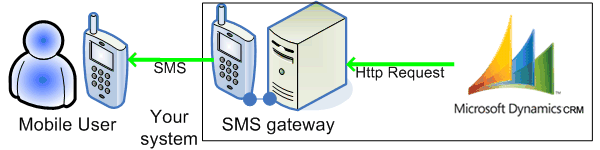
Once the text of the message is composed in your system, MS Dynamics CRM forwards
this message to the Ozeki NG SMS Gateway software with the help of a HTTP request.
The SMS gateway processes this message and sends an SMS text message to the previously
defined telephone numbers. This simple but effective process can be examined on Figure 1.
|
Figure 1 - Messaging process with Ozeki NG SMS Gateway
How to adopt SMS for MS Dynamics CRM
In order to send SMS messages from Microsoft Dynamics CRM 4.0 you need to do only a few settings. First, Dynamics CRM needs to be configured. After you log into Dynamics CRM you need to install new entities in it. Then you need to install a plugin with the help of Plugin Installation Tool. Finally, you need to create Workflows in Dynamics CRM. For step by step installation guide with a video tutorial please go to setup instructions page.
Conclusion
To summarize the above mentioned if you add SMS functionality to your corporate IT environment you will gain a modern communication system. SMS technology provides several advantages for you if you wish to improve customer relations and communication flow within and outside of your company. You can send important messages to your customers at any time and they will receive your messages even if they are away from the office. This solution reduces IT costs and save valuable time for you while you get a reliable, stable and high-quality service.
Please go to the
- Installation guide to learn how to send SMS from Microsoft Dynamics CRM 4.0!
- If you wish to add SMS extension to your corporate IT environment please go to the download page to download Ozeki NG SMS Gateway.
- To read about the possible connection types, please go to GSM modem vs IP SMS connection
- To learn how to benefit from implementing SMS solutions in your business, please go to SMS solutions for businesses page