SEND SMS ALERT FROM YOUR SYSTEM: SCOM 2007 MOM 2005 HP Openview WhatsUp Gold Sharepoint Notes
    
Home Solutions Applications Products Download About Us
    
OzekiNG-SMS-Gateway.zip (5 MB)
for Windows XP,2000,2003,2008,Vista,Windows 7
free 20 day trial version
Menu
  Welcome page
  Applications
  Solutions
  SCOM 2007
  MOM 2005
  HP Openview
  WhatsUp Gold
  SysAid Helpdesk
  Sharepoint
  HTTP
  E-mail
  Command line
  Database
  Lotus Notes
  Checkpoint Connectra
  Vacman Middleware
  IBM Tivoli
  Outlook Mobile Service
  Outlook setup instructions
  Trouble Shooting
  Microsoft Dynamics CRM
  Microsoft Exchange 2007
  Kayako
  EMail Client
  Big Brother
  BMC
  CA Unicenter
  HP Insight Manager
  PHP OTP
  Twitter to SMS
  RSS to SMS
  Visual FoxPro
  MS Exchange 2003
  MS Outlook 2010
  Nagios
  Strong Authentication Server
  Zenoss
  MS Exchange 2010
  Businesses
  Products
  Contact
  Sitemap

Contact Us!
If you wish to get further information, do not hesitate to contact us!

E-mail: info@sms-integration.com

Useful information
How to send SMS with a GSM modem attached to your PC?


This solution is best if you are planning to send or receive up to 4000 SMS per day. Read more:
  • Prerequisites
  • Setup instructions
  • Video tutorial


    How to send SMS through the Internet?


    If you wish to send more then 4000 SMS per day, it is a good idea to use an Internet SMS service provider. Read more:
  • Prerequisites
  • Setup instructions
  • How to send SMS from Microsoft Outlook 2007

    Ozeki offers a powerful solution for sending SMS from Microsoft Outlook 2007 to mobile phones. With this possibility you can add SMS functionality to your corporate IT system to improve communication. To achieve this functionality you need a stable SMS gateway such as Ozeki NG SMS Gateway which is a software product and can be installed on your computer. It forwards SMS messages to the mobile network either with a GSM modem attached to the PC or it connects directly to the SMS center of the mobile service provider over the Internet. This solution will provide you an effective and well-functioning SMS system. In this article you will find detailed information on this solution.

    For step by step instructions on this solution, please open to the following page:
    Installation guide on how to configure MS Outlook 2007 to be able to send SMS ( Video tutorial included)

    Fields of applications

    SMS messaging is a widely used communication mechanism both in business and everyday life. As it is one of the simplest and quickest communication method today, SMS technology is welcomed in business sector as well. But there is still an urgent need to connect computers to mobile phones to ensure availability and fast response possibilities.

    Microsoft Office Outlook 2007 includes a new feature among its services which can be a solution for this issue. It is called Outlook Mobile Service. With the help of this application it is possible to create and send SMS text messages to mobile devices from your computer. In this way e-mail messages, reminders and calendar entries can be forwarded to your mobile device when you are away from the office. Therefore you will be available in all the time and you will never miss important events or meetings. In this way Outlook Mobile Services can function as a complete personal information manager.

    These excellent features can be achieved with the use of an SMS gateway software. This software will provide the necessary SMS functionality to your corporate IT system. Therefore you will be able to send and receive SMS messages from your computer to mobile phones. This SMS functionality makes you possible to be always available even if you are away from the office. Furthermore, with SMS technology you can keep in touch with your colleagues, customers, business partners.

    Ozeki NG SMS Gateway is a software which is able to meet the above mentioned properties to provide SMS extension to your corporate IT environment. Using an SMS gateway software also makes bi-directional communication possible. This means that a text message is sent from your computer (from Outlook) is received on a mobile phone. The user of the phone can reply to this text message and this reply will be sent to the sender's mobile phone. If you decide to implement this solution you will get a stable and well-functioning system to improve communication within and outside of your company.

    Benefits

    By combining Ozeki NG SMS Gateway with Outlook Mobile Services you will gain a modern information manager system. You will be able to forward your important calendar entries, urgent reminders or even received e-mail messages as an SMS message. In this way you can save time and money as you always be up-to-date, prepared and well-informed. It is also possible to send one message to more than one mobile phones and to e-mail addresses at the very same time. So you do not need to send a message twice or more if there are numbers of recipients. Moreover you do not need to choose from the sending methods as you can send your message both as SMS and e-mail message. With this solution you will always be available. You also can improve your corporate communication as SMS messages are simple but still very effective and quick methods of communication.

    Prerequisites

    In order to setup this solution you need the following system components (Figure 1). Please feel free to browse through this checklist and see if you have all the necessary components.

    Figure 1 - Prerequisites for Ozeki NG SMS Gateway

    Your checklist:

    SIM Card - You can get this from your local mobile network operator.*
    Modem - Use a Wavecom, Siemens or Multitech modem.
    Data cable - Comes with the modem
    Computer - Recommended: Intel P4 3Ghz, 2GB RAM, 500MB HDD, Windows OS
    Ozeki NG SMS Gateway - Download it from http://www.sms-integration.com
    Microsoft Outlook 2007

    *The SIM card will come with a plan, that will determine how much money you will spend on each SMS.
    Ozeki NG SMS Gateway can be obtained by
    opening the download page:
    Download Ozeki NG SMS Gateway!

    System architecture

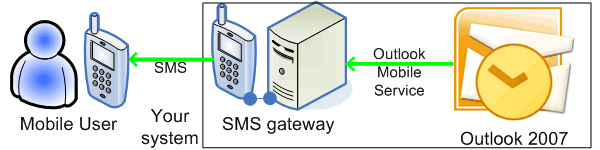
    Ozeki offers a solution for send SMS from Microsoft Outlook 2007. It works as follows: First you need to compose your message in Outlook. Microsoft Outlook 2007 connects to Ozeki NG SMS Gateway over web service. With the help of it, the message will be forwarded to the SMS gateway which will process it and send an SMS message to the given mobile phone with the text of your message. If there is an IP SMS connection between your gateway and the SMS center of a mobile service provider then you can receive a reply to your SMS. It is possible because the SMS gateway is able to set the phone number, which was provided in Outlook, as the phone number of the sender. In this way you can get the reply to your mobile phone. This process can be examined in Figure 2.

    Figure 2 - Ozeki NG SMS Gateway - solution for how to send SMS from Microsoft Outlook 2007

    How to implement this solution

    To send SMS messages in Microsoft Outlook 2007 you need to do some settings. This solution requires encrypted connection so first you need a certificate for this purpose. Then configuration in Ozeki NG SMS Gateway is also necessary. Here you need to create a new user and provide an address where you wish to provide this service. Finally you need to set Outlook also. For a detailed installation guide please go to setup instructions.

    Conclusion

    To sum the above mentioned, if you add SMS functionality to your corporate IT system with the help of an SMS gateway you will enjoy several advantages. This solution provides you a seamless communication experience at the highest level. SMS technology makes it possible to be available in all the time and to improve corporate communication. With the implementation of this solution you will get a secure, reliable and cost effective communication system based on SMS technology.

    Please go to the

    Request a quotation!

    If you are interested in this solution, let us know, so we can send you more relevant information and quotation with prices. Please fill in the following form:


    Your name:
    Company:
    E-mail:
    Tel:
    Country:
    Message:


    Contents at a glance:
    Home > Solutions > Outlook Mobile Service
    Feel free to contact us for additional information. Tel: (36) 52 532 731, Fax: (36) 52 532 732, E-mail: info @ ozekisms.com
    Copyright © 2000 - 2010 Ozeki Informatics Ltd. - All rights reserved.

    PAGE INFO