SEND SMS ALERT FROM YOUR SYSTEM: SCOM 2007 MOM 2005 HP Openview WhatsUp Gold Sharepoint Notes
    
Home Solutions Applications Industries Products About Us
    
SMS from MS Sharepoint solution presentation
MS Powerpoint presentation (.ppt) 844Kb
SMS from MS Sharepoint solution overview
Adobe PDF file (.pdf) 428Kb
Menu
  Welcome page
  Solutions
  SCOM 2007
  MOM 2005
  HP Openview
  WhatsUp Gold
  SysAid Helpdesk
  Sharepoint
  Sharepoint setup instructions
  HTTP
  E-mail
  Command line
  Database
  Lotus Notes
  Checkpoint Connectra
  Vacman Middleware
  IBM Tivoli
  Outlook Mobile Service
  Microsoft Dynamics CRM
  Microsoft Exchange 2007
  Kayako
  EMail Client
  Big Brother
  BMC
  CA Unicenter
  HP Insight Manager
  PHP OTP
  Twitter to SMS
  RSS to SMS
  Visual FoxPro
  MS Exchange 2003
  MS Outlook 2010
  Nagios
  Strong Authentication Server
  Zenoss
  MS Exchange 2010
  Joomla! SMS
  Drupal SMS
  Gmail to SMS
  Applications
  Industries
  Products
  Contact
  Sitemap

Contact Us!
If you wish to get further information, do not hesitate to contact us!

E-mail: info@sms-integration.com

Useful information
How to send SMS with a GSM modem attached to your PC?


This solution is best if you are planning to send or receive up to 4000 SMS per day. Read more:
  • Prerequisites
  • Setup instructions
  • Video tutorial


    How to send SMS through the Internet?


    If you wish to send more then 4000 SMS per day, it is a good idea to use an Internet SMS service provider. Read more:
  • Prerequisites
  • Setup instructions
  • How to send SMS from Sharepoint

    Ozeki offers a solution for those who use Microsoft Office Sharepoint server for improving workflow in their company. The SMS functionality added by Ozeki NG SMS Gateway makes it possible to extend the functions of Sharepoint to satisfy the needs of the IT staff, the managers, and the employees. In this overview you can learn more about this solution, the use and the benefits of it and you can read about what the prerequisites of setting up this system are.

    For step by step instructions on this solution, please visit the following page: Installation guide on how to add SMS functionality to Sharepoint. ( Video tutorial included)

    Fields of application

    In corporations employing thousands of people it can be difficult to create a well-functioning workflow management system though these systems are inevitable in a successful company. Sharepoint handles several events of workflow and documentation management but difficulties such as getting new information on time, availability, effective information exchange can still cause stoppages in the workflow.

    The solution is sending SMS messages from your system to mobile devices to improve the communication processes within and outside the company. With SMS functionality employees can be informed about their exact tasks in time improving communication flow between different departments in a company so there will be no delays. You will be able to supervise your system, employees or production steps as there is a possibility to store the messages. So if there are no reactions to alerts or tasks sent in SMS the responsible can be questioned.

    Thus Ozeki's solution enables quick and reliable information exchange within your company which eventually creates a productive and effective company atmosphere. This article gives you further information on how to send SMS from Sharepoint to mobile phones using a web form.

    Benefits

    The benefits of adding SMS functionality to your Sharepoint can immediately be enjoyed. You can get a stable and well-organized workflow and documentation management system for controlling your corporation even from a distance and you can also supervise the work process of your plants or subsidiaries as they are constantly available. You can keep all the important tasks, steps or productions under your vision by continuously being informed about them. With this solution you will get a reliable, time and money saving system to help you become successful and marketable.

    Prerequisites

    In order to setup this solution you need to find a way to connect your system to the mobile network. You can do this by using an Internet connection or you can setup a wireless connection by attaching a GSM phone/GSM modem to your computer. To help you make a decision, we have prepared a webpage for you: Internet based SMS connections vs. GSM modem based (wireless) SMS connections. Depending on what you select, you need the following prerequisites.

    Prerequisites for Internet based connection to the Mobile network

    If you wish to connect your system to an SMS service provider over the Internet you need the following components:

    Figure 1/a - Prerequisites for Ozeki NG SMS Gateway IP SMS connection

    In this case you need to find an SMS service provider who can reach the mobile phones in your area. This SMS service provider should be able to provide SMS service through the Internet. To find such a provider, you can check our website where we list some of them: SMPP SMS Service providers. Once you have found such a provider, you need to sign up for their service to get the connection parameters. You can use these parameters to configure your Ozeki NG SMS Gateway software.

    Prerequisites for wireless (GSM modem) connection to the Mobile network

    If you wish to connect your system to the mobile network wirelessly, you need a GSM modem or GSM phone, that you can attach to your computer with a data cable. In this case your Ozeki NG SMS Gateway software will operate this phone and will send and receive SMS messages wirelessly. To setup this connection method, you need the following components:

    Figure 1/b - Prerequisites for Ozeki NG SMS Gateway GSM modem connection

    Your checklist (for GSM modem connection):

    SIM Card - You can get this from your local mobile network operator.*
    Modem - Use a Wavecom, Siemens or Multitech modem.
    Data cable - Comes with the modem
    Computer - Recommended: PC 3 GHz, dual processor, 2GB RAM, 500MB HDD, Windows OS
    Ozeki NG SMS Gateway - Download it from http://www.sms-integration.com
    Sharepoint
    Ozeki NG SMS Gateway can be obtained by
    opening the download page:
    Download Ozeki NG SMS Gateway!

    System architecture

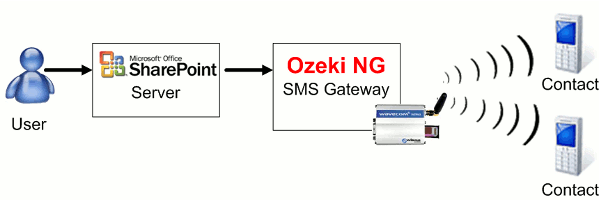
    Ozeki's solution provides SMS functionality for Sharepoint. It works as follows: You just need to compose your SMS text message and choose the recipients from the SMS contact list. Then you can send your message to one or more addresses. Sharepoint server forwards it to Ozeki NG SMS Gateway which reads the message and then transmits it to the given recipients (Figure 2).

    Figure 2 - Ozeki NG SMS Gateway solution for how to send SMS from Sharepoint

    How to implement this solution

    Sharepoint is an excellent workflow and documentation manager software which makes it possible to organize your company's work process in a professional way. But you can increase the efficiency of Sharepoint by adding SMS functionality to it.

    To send SMS with Sharepoint you need to configure Ozeki NG SMS Gateway to do so. First you need to download it from the download site and import it into your Sharepoint software. As soon as the importation is completed you can start composing and sending SMS text messages. For further information please visit the Installation guide.

    Conclusion

    Microsoft Office Sharepoint with Ozeki NG SMS Gateway is the best solution if you want to improve workflow management in your company. The SMS functionality furthermore makes your business more modern, up-to-date and consequently more attractive to customers. Future and existing customers can be continuously in touch with your company thus their support needs are satisfied. In addition your employees can work more accurately as they are aware of their exact responsibilities. With the configuration of this solution you will get a reliable and stable system which makes it possible to be effective and competitive while you save time and money by organizing work processes in a well-structured manner.

    Please visit our

    Request more information

    If you are interested in this solution, let us know, so we can send you more relevant information and quotation with prices. Please fill in the following form:


    Your name:
    Company:
    E-mail:
    Tel:
    Country:
    Message:


    Contents at a glance:
    Home > Solutions > Sharepoint
    Feel free to contact us for additional information. Tel: (36) 52 532 731, Fax: (36) 52 532 732, E-mail: info @ ozekisms.com
    Copyright © 2000 - 2010 Ozeki Informatics Ltd. - All rights reserved.

    PAGE INFO