

 Solutions
  Applications
  Industries
  Products
  Contact
  Sign in
 One-Time Password example for PHP developers
Two factor authentication makes it possible to build a secure and efficient IT network. Practically it means that one-time passwords are sent to mobile phones as SMS messages to authenticate the user. With this functionality you can ensure the security of your IT system. To achieve this function you need an SMS gateway such as Ozeki NG SMS Gateway. Ozeki NG SMS Gateway is a software product that needs to be installed on your computer. It connects to the mobile network with a GSM modem attached to the computer or it directly connects to the mobile network over the Internet. If you implement Ozeki NG SMS Gateway to send one-time passwords from PHP, you will get a stable and well-functioning system. This article will provide you further information on this solution.
Download: PHP-One-Time-Password-example.zip (3 Kb) (Source code included)
Fields of applications
If you wish to setup a secure and well-functioning system then
you need to pay attention to the accessibility of your corporate data. Passwords
are widely used to protect important data both in everyday and in business life.
Though several problems can occur with these passwords. Employees write them
down, lose them, forget them or send them in email. In such inconvenient cases,
passwords are no longer able to function as security items. On the other hand,
if you apply long and difficult passwords then nobody will be able to remember
them. There is the same case if you change corporate passwords too often. All in
all, static passwords are not able to provide high level security.
The solution is if you add SMS functionality to your
corporate IT system with a powerful SMS gateway such as
Ozeki NG SMS Gateway. With this SMS
functionality you can introduce one-time passwords. These one-time passwords
are sent to the mobile phones of users as SMS messages. So if authenticated
users wish to login they need to provide this sent password. This effective
method makes two-factor authentication possible.
Two factor authentication means, that a user types in his password, then he
receives an SMS text message to his mobile phone with a one-time security code
and he needs to enter it to complete the authentication. This solution makes
your IT system secure as users can enter the system only with the use of these
one-time passwords. The life time of these passwords are quite short and if
they are not used for some reason then they expire automatically. With this
functionality you can ensure that no unauthorized person get access to your
corporate data.
Prerequisites for this solution
To implement this solution, you need to connect your system to the
mobile network. For this purpose you can use Internet
connection or a GSM phone/GSM modem attached to your computer (this way you will
have a wireless connection).
The following webpage gives you all the information to decide which solution suits
your requirements best: Internet
based SMS connections vs. GSM modem based (wireless) SMS connections.
You need the following prerequisites, depending on your choice.
Internet based connection:
For connecting your system over the Internet to an SMS service provider, you need the follows:
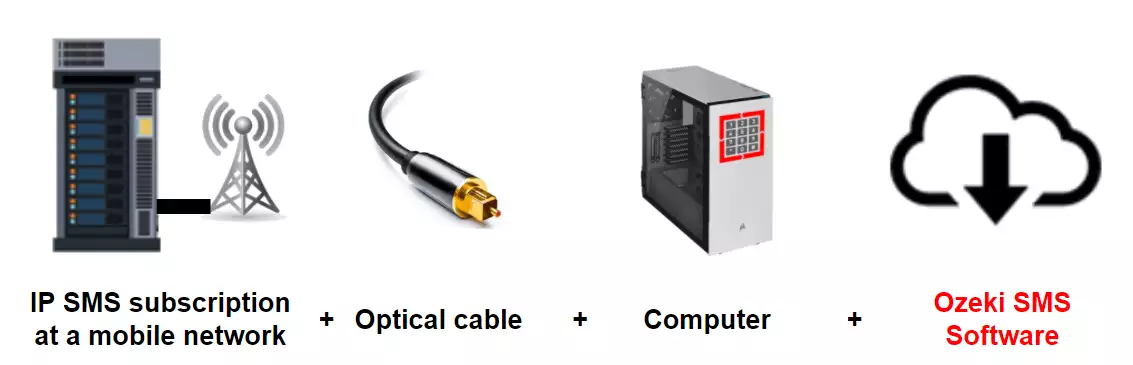
First of all, you need a service provider, who can reach the mobile phones in your
area and enables you to connect to their SMSC through the Internet. The following
website lists some of them: SMPP SMS Service providers. After you have chosen a service
provider, you need to sign up for their service. This will you will get connection
parameters that can be used to configure your Ozeki NG SMS Gateway software.
GSM modem connection:
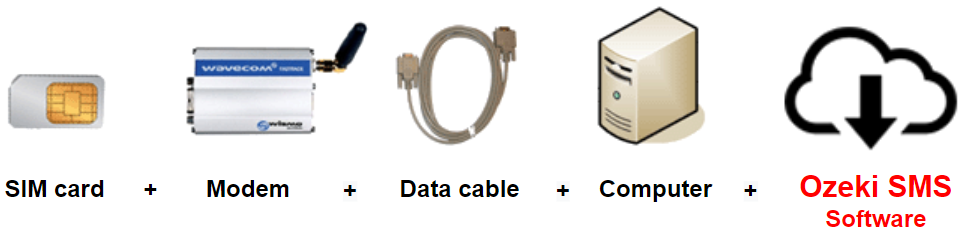
For a wireless connection, you need a suitable GSM phone/GSM modem that can be attached to your computer with a data cable. This way, Ozeki NG SMS Gateway software will send and receive the SMS messages wirelessly, using the GSM modem. To create this connection, you need the following prerequisites:
 |
SIM Card - You buy one from your service provider.* |
|
Modem - - Use a Wavecom, Siemens or Multitech modem. |
|
Data cable - Comes with the modem |
|
Computer - Recommended: Intel P4 3Ghz, 2GB RAM, 500MB HDD, Windows OS |
|
Ozeki NG SMS Gateway - Download it from http://www.sms-integration.com |
* The cost of an SMS message is determined by the price plan you have chosen when you have purchased the SIM card from your GSM mobile network operator.
 Ozeki NG SMS Gateway can be obtained by opening the download page:
Download Ozeki NG SMS Gateway!
Ozeki NG SMS Gateway can be obtained by opening the download page:
Download Ozeki NG SMS Gateway!
System architecture
If you meet the above mentioned system requirements, you can start to setup your SMS system to send one-time passwords. It will work as follows: First you need to log into your PHP site with a username and password. After this login the PHP script sends your one-time password to the phone number that is assigned to your username through Ozeki NG SMS Gateway. A site will appear with a form in which you need to type in the sent one-time password. If you provide your password properly, you can enter the protected site. The SMS gateway forwards the one-time password to the mobile network with the help of a GSM modem attached to the computer or it connects directly to the SMS center of the mobile service provider. You can examine how to send one-time passwords with Ozeki NG SMS Gateway in Figure 1.
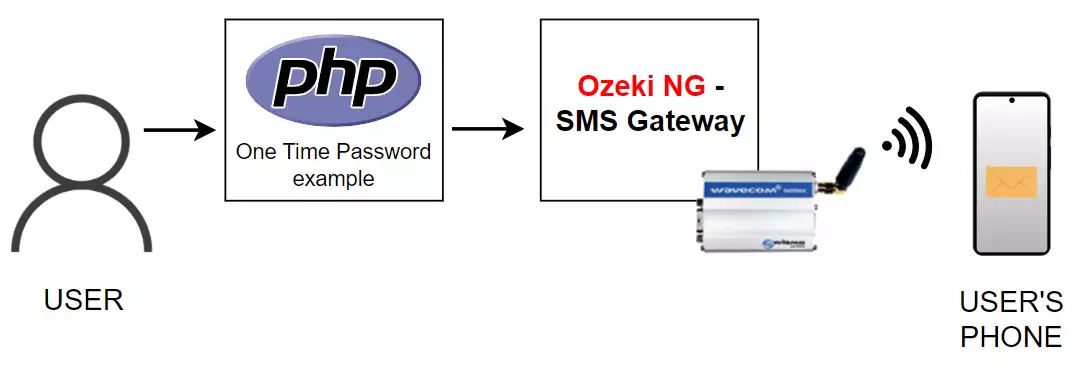
Please note that it is more secure to send the one time passwords using a GSM modem through the airwaves to the recipient, than through an Internet based SMS service provider account, because it is significantly harder to intercept an SMS message traveling through the air, than it is to intercept internet traffic.
How to implement PHP OTP SMS solution
To send one-time passwords via PHP with Ozeki NG SMS Gateway, you need to do the follows. First download the PHP source code. Save it into your webserver and after you save it, you can use a browser (Internet Explorer or Firefox) to open it. A form will appear in which you need to provide your username and password. After the login a one-time password will be generated and sent to you. An other site is opened and here you need to provide the sent password.
Download:
PHP-One-Time-Password-example.zip (3 Kb) (Source code included)
After you have provided your received one-time password, you will be redirected
to the protected content with the help of the include () function. The following
PHP code shows the protected PHP content.
Conclusion for PHP OTP SMS solution
To summarize the above mentioned, it is the best solution if you use Ozeki NG SMS Gateway to send one-time passwords from PHP. This functionality is based on two factor authentication which makes it possible to setup a high secure IT environment. Due to SMS technology, your one-time passwords are sent as SMS messages to further increase security as only the intended people will receive them. In this way no unauthorized person gain access to corporate data. You can still improve reliability and security of this SMS system if you apply a GSM modem attached to the computer with a data cable. This GSM modem connectivity is more secure than sending SMS messages over the Internet. If you decide to implement this solution you will get a stable, reliable and effective authentication system with the highest quality.
- If you have not downloaded Ozeki NG SMS Gateway, you can do it now if you go to our product pages.
- If you wish to learn more about connection possibilities, please go to GSM modem vs IP SMS connection page
- Please find how to benefit from implementing SMS solutions in your business on SMS solutions for businesses page
- FAQ
- Feature list of Ozeki NG SMS Gateway
- User Guide for Ozeki NG SMS Gateway
- Product manual
More information